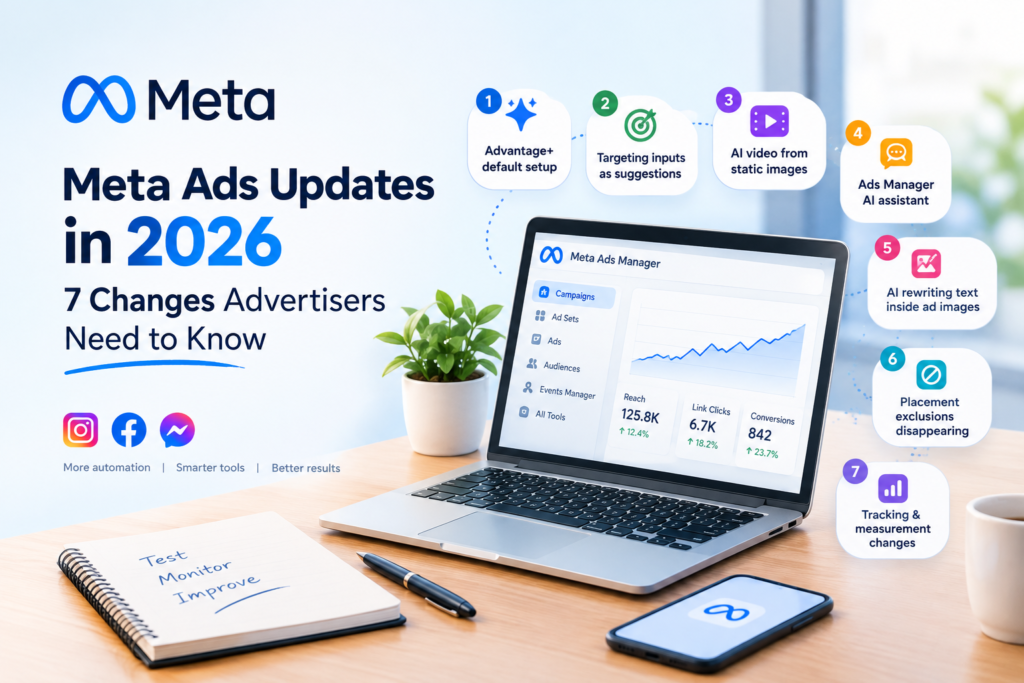
Meta Ads updates 2026 have arrived quickly and with force. Most of these changes aim to make advertising more automated. If you run ads for a company it can be hard to see which Meta Ads updates are truly important and which are noise.
I work with businesses in Palakkad. My rule is simple: test a feature with data before changing anything that already works.
In this guide, I list seven Meta Ads updates in language. I also share what I would check first when a new Meta Ads update arrives.
If a point comes from Meta’s announcements or from industry reports and not, from my campaigns I will say so.
At the end of this guide you’ll find a 30-minute checklist you can use today.
Meta Ads Updates 2026 at a Glance
Here is a quick summary of the changes, with their status as of 24 October 2026.
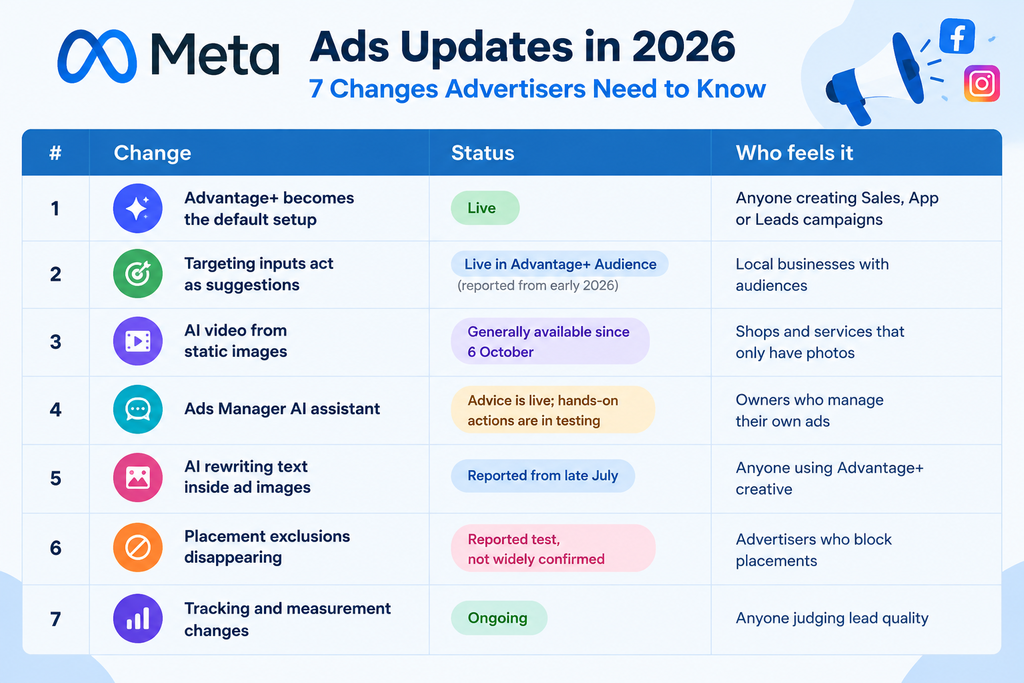
Meta Ads Updates 2026
1. Advantage+ Is Becoming the Default Campaign Setup
Industry trackers, citing Meta’s own notes, report that Sales, App and Leads campaigns began defaulting to Advantage+ in 2025. By early 2026, manual and AI setup flows were merged into one. Older Advantage+ shopping and app campaigns were also phased out, with API deadlines around 19 May 2026.
The result is that the manual path is now the exception, not the starting point.
My take: Automation works best when you give it an objective and clean data. So choose the objective carefully because Meta’s system will optimise for what you pick.
2. Detailed Targeting Now Works More Like a Suggestion
With Advantage+ Audience, interest-style targeting inputs are treated as hints, not strict rules. Meta’s system can reach people outside your selected interests if it expects them to convert.
This matters for a local business. Location settings are usually still firm controls, but confirm that in your own account. Do not assume your chosen audience will be followed exactly.
What I would do: Check delivery breakdowns by age and region after the first few days. Then ask a simple question: Is this campaign reaching the people who can actually buy?
3. AI Video From Static Images Is Now Generally Available
I was at Advertising Week New York on 6 October 2026. I heard Meta say that advertisers can now create video from existing assets in Advantage+ creative. Meta also started giving advertisers Ads Creative Studio, where advertisers can change hooks, audio and clip length. For a shop with only product photos, this removes the “I have no video” excuse.
What I would do: Treat the AI video as a draft. Check that the price, offer and message are correct. Then run AI video next to image ad under the same conditions and compare click‑through rate, cost per result, and for lead ads, enquiry quality.
4. The Meta AI Business Assistant Is Getting More Capable
The assistant inside Ads Manager now has memory and creative insights. Meta also said the assistant is testing hands‑on actions, such as generating, updating targeting, or changing a budget from a chat prompt. Meta reports that advertisers using the assistant see 5% more conversions at the same cost per conversion. That is Meta’s claim. I have not tested the claim myself.
My take: Use the assistant for ideas and checks. Review any change to targeting or budget before the assistant goes live because the assistant does not know your business the way you do.
5. Advantage+ Can Now Rewrite Text Inside Your Images
Advertiser reports from late July describe Advantage+ creative rewriting the headline text on uploaded images while keeping the font, colours and layout. One report mentions up to eight headline variants per image.
That is useful for testing, but it carries a risk. A rewritten image could change a price, a date or an offer.
What I would do: Always review previews. Meta has also moved towards separate controls for many creative enhancements, so look for the toggles in your ad settings and switch off anything that is not accurate for your offer.
6. Placement Exclusions May Be Going Away
19 August, a few advertisers saw a notice in Ads Manager that said you could no longer exclude placements, platforms, devices, and operating systems from your ad sets. Some reports say this change is widespread. I could not find a clear Meta announcement for each account.
What I would do: Open your ad sets. Check if you still have placement controls. If you do, look at results by placement. Be sure your creative works well in vertical formats, such as Reels and Stories.
7. Tracking and Measurement Settings Keep Moving
I have noticed changes in where URL tracking parameters are set in Ads Manager. Some industry trackers also report a shift towards attribution. That means Meta tries to credit ads for results they actually caused.
Menu labels change often. So a setup that worked last quarter may need a second look.
What I would do: Test your ad link. Check that UTM parameters are saved. Confirm that events arrive in Events Manager. If your customers contact you on WhatsApp, test that journey too.
What the Meta Ads Updates 2026 Mean for Businesses in Kerala
Most local businesses here—like clothing shops, restaurants, travel agencies and service providers—work with budgets. Automation can help them test creative with less effort. Only if the objective is clear and the data is reliable.
This is a sample scenario, not a real client result. A travel agency in Palakkad is looking for enquiries for weekend tour packages. I plan to run a lead‑generation campaign. I will test two creatives: a short destination video and an offer‑focused image. Both creatives will clearly show the destination, price, dates, and what is included.
I would let Meta’s tools deliver the ads. I would not judge success by clicks alone. I would check whether people reply to calls or WhatsApp messages. Whether enquiries become bookings. If one creative brings enquiries but few serious customers, I would compare cost and lead quality before choosing a winner.
The local context matters too. Language, location, offer, and timing all change how people in Kerala respond to an ad.
Need an opinion on your Meta campaigns? Get in touch through my website : freelance digital marketer in palakkad
Meta Ads Updates 2026 : Your 30-Minute Meta Ads Checklist
You don’t need to master every feature. Use this checklist to keep your budget safe.
Minutes 0–10: Check campaign setup
-
- Make sure the campaign objective matches your real business goal.
-
- Look over your audience, budget and placements.
-
- Check if automated targeting options are turned on.
Minutes 10–20: Verify tracking
-
- Test your ad links, landing pages, and lead forms.
-
- Check conversion tracking and UTM parameters.
-
- Test the WhatsApp enquiry journey if you use it.
Minutes 20–30: Review performance
-
- Compare cost per result, click-through rate, and lead quality.
-
- See if the creative and offer are still working well.
-
- Check what new features are available in your account, before making any changes.
Final rule: Don’t change a campaign that’s working just because there’s an update. Find a problem. Make one controlled change. Then measure the result.
what to investigate
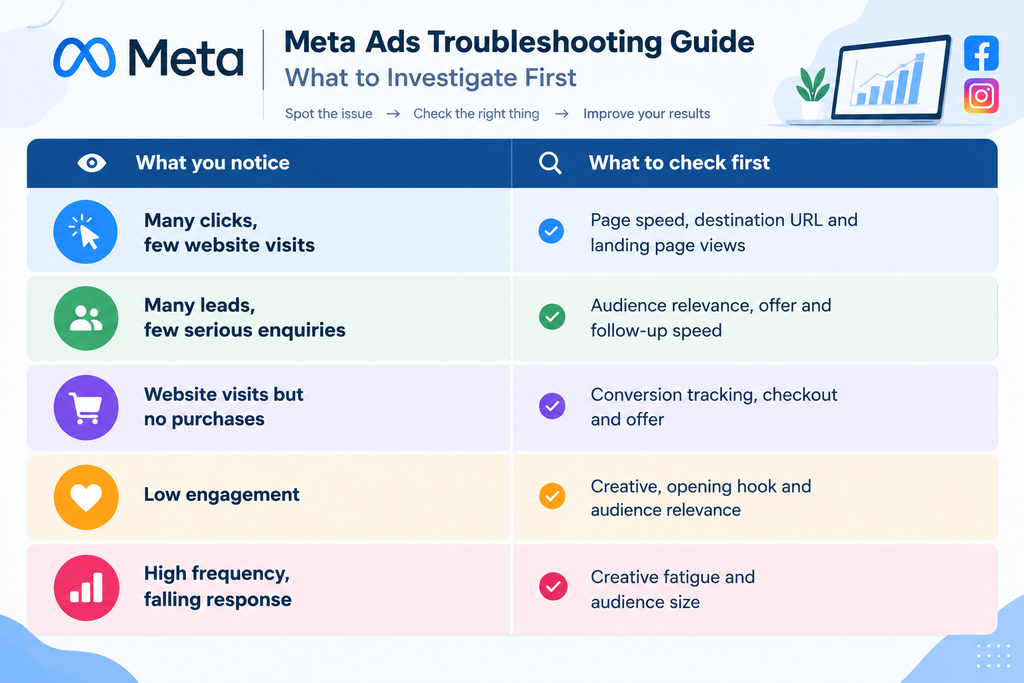
Menu names and feature availability vary by account campaign objective and interface version. So always confirm inside your Ads Manager.
Frequently Asked Questions
Is Advantage+ compulsory for every Meta campaign?
Not in every case. It is now the default for Sales, App and Leads campaigns. The manual path is harder to find. Availability can differ by account. So check your setup.
Should I switch on every new Meta Ads feature?
No. Switch on one feature per campaign at a time. So you can see what moved your results. New does not always mean better for your business.
How do I know if a new feature is available in my account?
Check the campaign and ad set editing screens. Then compare with Meta’s announcements and the Business Help Centre. Rollouts often reach accounts in stages.
What matters more than the update itself?
Clear objectives, tracking, and lead quality. Updates change the tools.. Measuring real business results stays the same.
conclusion : Use the Updates but Keep Your Judgement
Meta Ads updates 2026 point in one direction: more AI, more automation, and manual controls. That can save time. Help small businesses test more ideas.
Automation does not replace your judgement. Start with an objective. Check tracking. Review the creative. Judge leads by quality, not only by cost, per lead. Then make one controlled change at a time. Let the data decide.