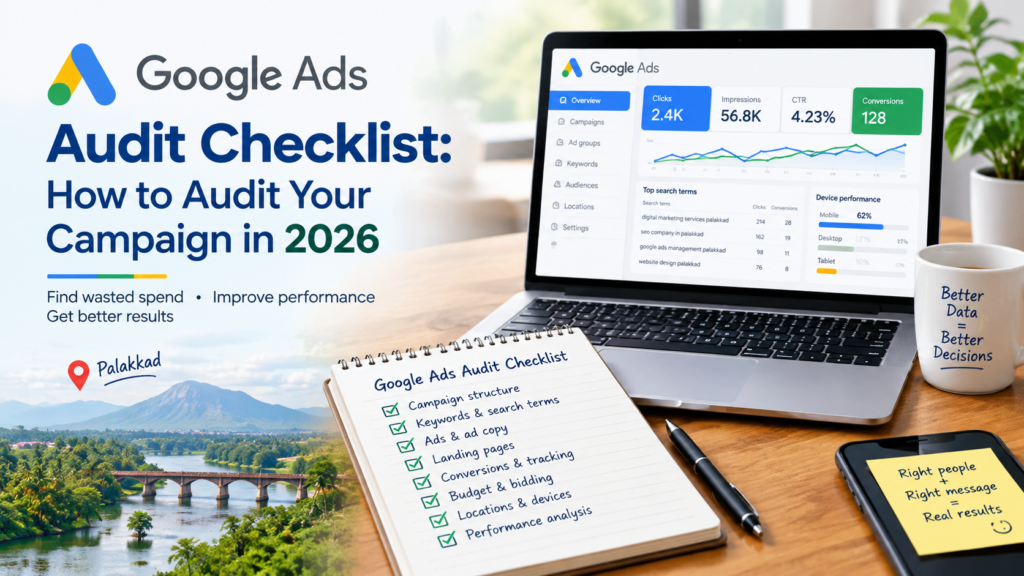
A Google Ads campaign can look healthy on the dashboard and still waste money. Clicks arrive, the CTR looks decent, and the CPC seems fair. Yet the phone stays quiet.
A proper Google Ads audit checklist is designed to find that gap. In this guide, I will share the order I use when I look at a campaign, why that order is important, and the local checks that are useful for businesses in Palakkad.
A note about being open: the examples below are example situations, not real client stories. This is my way of doing an audit. You will need to change it based on your industry, your budget, and your way of placing bids.
Why You Need a Google Ads Audit Checklist Before Changing Anything
Most people jump straight to bids, ads, or keywords. Without a Google Ads audit checklist, it’s easy to fix the wrong thing first.
My rule is simple: measurement before optimisation. If the data can’t be trusted, every decision built on it is a guess.
A checklist also stops you from overreacting. One poor day rarely tells you much. Look for patterns over time instead of making major changes because of a single day’s numbers.
The Google Ads Audit Checklist, Step by Step
Work through this Google Ads audit checklist in order. The sequence matters.
- Check conversion tracking first
First ask what Google Ads considers a conversion and make sure that matches a result from the business.
Google divides conversion actions into primary ones, which are shown in the Conversions column and affect how much you bid, and secondary ones, which are only for monitoring and not used for bidding. So if a page view or button click is marked as primary, the account may optimise towards low-value actions. Google explains the difference in its guide to primary and secondary conversion actions.
google
Check these points:
- Which actions are tracked: calls, enquiry forms, WhatsApp clicks, bookings, or purchases?
- Are the important actions set as primary?
- Are any conversions counted twice?
- Does the conversion value make sense for the business?
- Is GA4 linked correctly, where relevant?
- Are there sudden spikes or drops in conversion data?
Here is an illustrative example. I imagine a business that spends ₹500 every day. Google Ads reports ten conversions from one hundred clicks. If those clicks land on a button that’s not important such as a non‑essential button instead of a call or message button the number does not help the owner at all.
That’s why tracking comes first in my Google Ads audit checklist.
- Review the search terms report
Next, compare the keywords you added with the searches that actually triggered your ads. Google’s help documentation treats the search terms report as a source of negative keyword ideas, because it shows the real queries behind your clicks. You can follow Google’s steps for using the search terms report inside your account.
google
Look for:
- Searches for jobs, courses, salaries, ” free services “, or ” how to learn “
- Informational queries when you want ready-to-buy customers
- Searches from areas you don’t serve
- Irrelevant patterns that keep repeating
But don’t add every non-converting term as a negative keyword. A term with no conversion yet may still be relevant. Weigh relevance, intent, volume, cost, and conversion behaviour together. Then build negatives around patterns, not one-off queries.
- Check keywords and search intent
Not every click carries the same intent. “Digital marketing services Palakkad” signals someone with a need. “What is digital marketing?” signals someone learning.
Sort your keywords into informational, commercial, and high-intent local searches. Then check whether broad targeting is pulling in the wrong audience.
- Match your ads to your landing pages
A visitor should grasp four things quickly: what you offer, where you offer it who you serve and how to enquire. A location‑specific ad that leads to a page breaks the journey from search to ad to page to enquiry.
Be careful with location words in ad copy, too. Mention Palakkad only when it matches your real service area, and the landing page supports it.
- Review budget and bidding
Look at which campaigns and locations consume the most budget, and which produce useful enquiries. Don’t pause everything that hasn’t converted, though. A campaign needs enough data before you judge it. Look for clear mismatches between spend, relevance, and results.
For a wider look at small daily budgets, see my post on ₹500 a day on Google Ads in Kerala.
- Connect the data to real leads
Ten recorded conversions do not automatically mean ten customers. Compare the Google Ads numbers with enquiries, appointments, and sales. If the account shows fifteen conversions. The owner can only show three real enquiries to investigate before making any other changes.
Ask one question for every click. What type of person did this search represent? What was their intention? How much did we pay? Did the visit help the business? That question turns a simple settings check into a business outcome audit.
Location and language targeting get their own section below, because they matter most for local businesses.
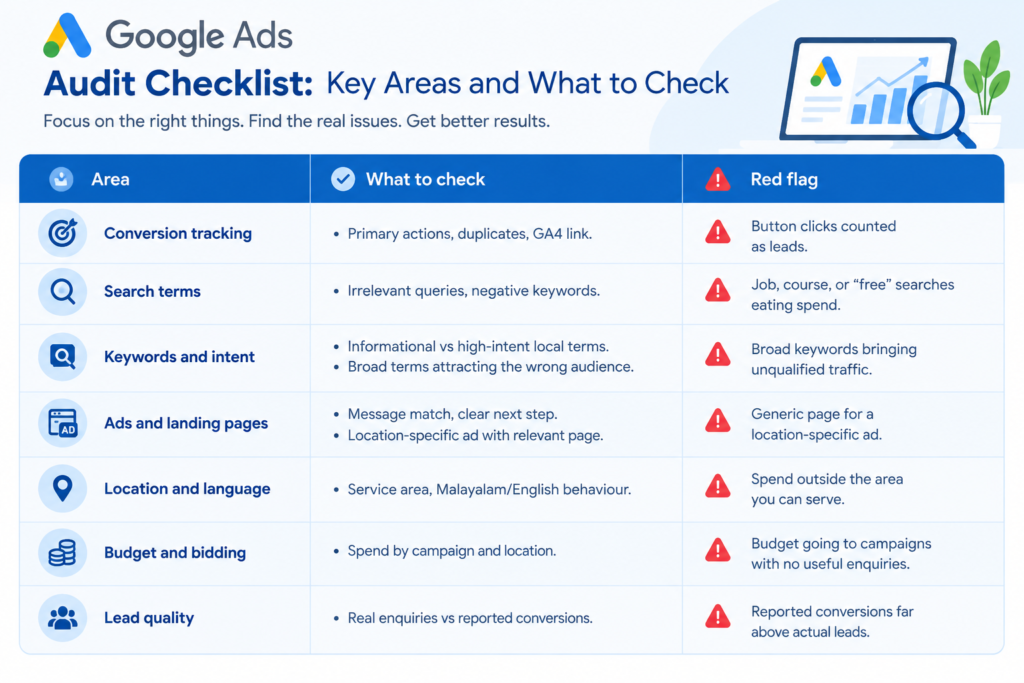
Google Ads Audit Checklist at a Glance
Keep this table beside you as a quick Google Ads audit checklist while you review your account.
Google Ads Campaign Audit in Palakkad: Local Checks Most Guides Miss
A generic Google Ads audit checklist tells you to check location targeting, keywords and conversions. A local audit goes further. It asks whether those settings match how people in your area actually search, enquire, and buy.
Service area, not just district
Compare your targeted locations with the places you can genuinely serve. A business serving Palakkad town and nearby areas shouldn’t necessarily use the same targeting as one serving the whole district. Check for impressions outside your service area, whether exclusions are needed, and whether some areas perform better than others.
Malayalam, English, or both
Do not create campaigns just because Malayalam is widely spoken. First, read the search terms. A customer might search in English. After you contact me in Malayalam or you search in Malayalam then you contact me in English. Therefore I review search queries, the language of the ads the language, on the landing page and the language customers use when they get in touch.
How locals actually contact you
Customers can call, send a WhatsApp message ask for directions request a quotation or book an appointment. One genuine phone enquiry can be worth than ten visits to the website so make sure your tracking records the action that matters most to your business.
Working hours and response time
If your ads spend heavily when nobody can answer the phone, that deserves a look. If WhatsApp is a key channel, you also need a practical process for replying quickly. A lead only counts if someone follows it up.
Local competition
Depending on your service, you may compete with providers across Kerala or nationwide, not just in Palakkad. That affects keywords, CPC, messaging, and budget.
This matters even more for Google Ads audit checklist for small businesses in Palakkad. A large advertiser can absorb wasted clicks. A small daily budget can’t. If you’re still choosing between channels, read my comparison of SEO vs Google Ads for small businesses in Palakkad.
A 30-Minute Google Ads Audit Checklist for Busy Owners
If you only have thirty minutes, don’t try to check every setting. Do the three checks listed below instead. This quick Google Ads audit checklist helps you find out fast if the correct people are seeing your ads and if your data is accurate.
- Search terms (10 minutes): Are the right people searching for me? Look for irrelevant queries, out-of-area searches, and repeating patterns.
- Conversions vs real leads (10 minutes): Are those people becoming useful enquiries? Compare what Google Ads reports with what actually happened in the business.
- Spend by campaign and location (10 minutes): Am I spending in the right places? Look for campaigns or areas using budget without producing useful results.
If I had to simplify the Google Ads audit checklist into one rule, for busy owners it would be this: don’t make changes based on data you don’t believe in.
When to Bring in a Google Ads Expert
The Google Ads audit checklist above is designed so an owner can handle the basics. But some problems need deeper diagnosis. Consider expert help when:
- Conversion tracking is wrong or duplicated
- You can’t tell which conversions are valuable
- The account has many campaigns, ad groups, and keywords
- Search-term problems are widespread
- CPC or spend has risen without a clear reason
- Several bidding strategies are in use, and you’re unsure how they interact
- Landing pages may be dragging performance down
- Monthly spend is significant, so small mistakes get expensive
- You’ve made changes but can’t explain why results moved
A good Google Ads expert in Palakkad will review tracking, search intent, location targeting, landing pages, and past performance together before recommending big changes. If you’d like a second opinion, my Google Ads services in Palakkad page explains how I approach Google Ads management in Palakkad, from audit to ongoing optimisation.
Google Ads Audit Checklist FAQs
1. What should a Google Ads audit checklist include?
At a minimum I check conversion tracking. I look at search terms. I review keywords and their purpose. I check ads and landing pages. I verify location and language targeting. I check budget and bidding settings. I make sure lead quality is real.
2. How often should I audit my account?
There’s no universal rule. As a general guideline, do a light monthly check of tracking, search terms, and spend, and a deeper review when performance changes for no obvious reason.
3. Do I need to add every irrelevant search as a negative keyword?
No. First confirm the term is truly irrelevant, and look for patterns. A term with no conversion yet may still be worth keeping.
4. Can I check my own Google Ads account?
Yes, the basics are easy to handle. Use the thirty-minute version above. Ask for help if tracking seems wrong or if your spending is high.
Conclusion: Start With Measurement, Then Everything Else
A Google Ads audit checklist only works if it follows a sensible order. Confirm your tracking first. Then review search terms, intent, landing pages, and budget. Finally, check whether reported conversions match real leads.
Three actions you can take today:
- Open your conversion actions and confirm which ones are set as primary.
- Read your recent search terms and note any repeating irrelevant patterns.
- Compare reported conversions with the real enquiries your business received.
Use this Google Ads audit checklist as a starting point, then change it to fit your business. If the numbers still don’t make sense, get an opinion before making big changes.
Is Your Google Ads Budget Going to the Right Places?
Use this Google Ads audit checklist to identify tracking issues, irrelevant search terms, wasted spend, weak targeting, and low-quality conversions. If you’re unsure what your campaign data really means, I can help you review your Google Ads setup and identify practical areas for improvement.