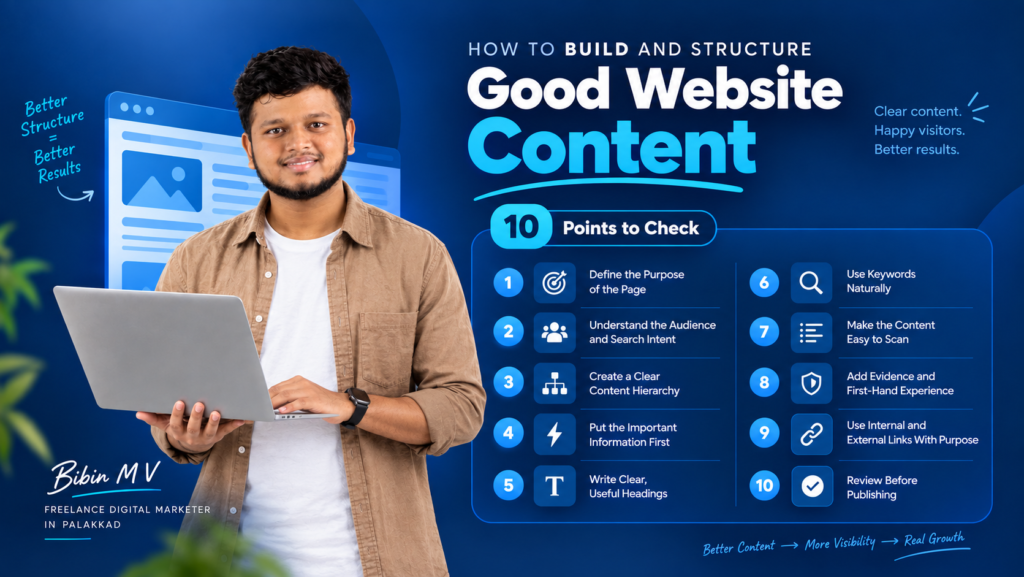
How to Build and Structure Good Website Content :
10 Points to Check
How to Structure Website Content
If you ever put stuff on a website and still didn’t get better results, the issue is likely not how much you wrote. It’s how you organize that content.
Over the years of working with local businesses in Kerala on their SEO and content, I’ve noticed the same pattern again and again: the information is already there; it’s just arranged around the business instead of around the visitor. A service page starts with an introduction about the company and the real service details. What is available, who it is for, how to begin. Are hidden several scrolls down.
Learning how to arrange website content isn’t about following a set plan. It’s about knowing what your visitor wants to find and creating a way that gets them there fast. Here are the ten things I look at on every project, whether it’s a website redesign or just one landing page.
Why Website Content Structure Matters More Than Word Count
A page that has text and a simple setup can be better than a page that is very long and forces people to search for the answer. A good website content structure does two things at the time: it helps a real person understand your offer quickly and it helps search engines know what your page is really about.
Before I write a word I try to ask one question: what is the visitor trying to understand and can the visitor find that answer quickly? That one question changes how you handle every page, on your site.
The 10 Points to Check
How to Structure Website Content
1. Define the Purpose of the Page
Every page should have a job. A service page needs to help someone evaluate a service. An informational article needs to answer a specific question thoroughly. A landing page might exist to generate enquiries.
When you don’t have a purpose, the content often becomes too long. You start adding details without asking if they matter. It’s easy to include things that don’t belong.
2. Understand the Audience and Search Intent
Don’t create a page simply because a keyword has search volume — understand the problem behind the search.
Someone searching “how to structure website content” is looking for a practical framework. Someone searching “website content services” is evaluating providers. The keywords might be related, but the content each person needs is completely different. This distinction should shape your introduction, your headings, and your call to action.
3. Create a Clear Content Hierarchy
This is one of the important parts of how website content is organized. Headings and sections need to make sense as a path through the information using H1, H2, and H3 tags.
A simple test: turn off the paragraphs. Just read the headings. If you still don’t know what the page is about from the headings, the structure needs fixing before the writing gets done.
How to Structure Website Content ; Example hierarchy for an SEO topic:
H2: Keyword Research
H3: Finding Relevant Search Terms
H3: Understanding Search Intent
H2: On-Page SEO
H3: Title and Meta Description
H3: Heading Structure
H3: Internal Linking
H2: Technical SEO
H3: Crawling and Indexing
H3: Core Technical Issues
4. Put the Important Information First
Visitors shouldn’t have to scroll through paragraphs of company history before discovering what you actually offer. Open with context that gets to the point quickly, then answer the visitor’s most important questions in a sensible order — not the order that’s easiest for you to write.
5. Write Clear, Useful Headings
Headings should tell the reader exactly what they’re about to learn, not just contain a keyword. “Our Approach” tells a visitor nothing. “How Our Website Content Process Works” does.
6. Use Keywords Naturally
Keyword research matters for SEO-friendly website content, but keyword density is never the goal. Use the primary keyword where it naturally fits — usually the title and introduction — and weave in related terms like website content planning, content structure for SEO, and how to organize website content only where they genuinely add clarity. Forcing a phrase into every paragraph makes the writing worse, not better.
7. Make the Content Easy to Scan
Short paragraphs help. Bullet points make things clearer. Numbered steps guide people step by step. Tables organize information in a way that’s easy to scan. On phones, a huge block of text is hard to read. No matter how good the information is, it doesn’t help if no one can actually take it in.
8. Add Evidence and First-Hand Experience
This is where a lot of business content falls flat: broad, generic statements with nothing backing them up. Wherever possible, replace “good content improves user experience” with a specific example — a structural problem you found during an audit, and how reorganizing the page made it easier to navigate. Specificity is what makes content trustworthy.
9. Use Internal and External Links With Purpose
Internal links let visitors move between related pages without confusion. They keep people engaged and exploring your site naturally. External links to sources build trust. They show you’re not making up claims. Neither should be added just to hit a link count — each one should have a reason for being there.
10. Review Before Publishing
A first draft is not a page. Before you put the page live make sure the page content really answers the question people were looking for; make sure the page headings go in a logical order; make sure the page keywords are there naturally and not forced; check that the page links work; check that the page call, to action makes sense; and check that the page looks good on a phone. This last check finds issues that’re easy to miss while you are still writing the page.
A Structure Fix in Practice
How to Structure Website Content
I often use a physiotherapy clinic’s “Back Pain Treatment” page to illustrate this. The page had everything it needed — treatments offered, common problems addressed, who the service suited, the clinic’s approach, and a way to get in touch. The issue wasn’t missing information; it was order. A long introduction about the clinic sat above the actual service details, which is exactly backwards from how a prospective patient thinks.
Reorganizing that kind of page around the patient’s decision-making process — what the service is, what problems it addresses, who may benefit, how the consultation works, why to trust the provider, and what to do next — doesn’t require rewriting the content from scratch. It’s a structural fix, not a content fix.
To be clear: reorganizing a page doesn’t guarantee a ranking increase — rankings depend on many factors. What structure reliably affects is user behavior: how far people scroll, whether they reach the sections that matter, and whether they act on what they read.
Common Website Content Structure Mistakes to Avoid
How to Structure Website Content
- Leading with company history instead of the visitor’s question
- Cramming multiple subtopics under one vague heading
- Treating structure as something to fix after writing, instead of during planning
- Prioritizing keyword count over natural readability
- Skipping the final review before publishing
FAQs
How to Structure Website Content
1. Does better website content structure guarantee higher rankings?
No single thing guarantees search rankings. A clean structure helps both visitors and search engines figure out what a page is about. That clarity supports all of your SEO work in the run.
2. Should every page be short?
No. Comprehensive pages. Often should be long. The goal isn’t to write content. It’s to make long content easy to move. Use sections, descriptive headings, and a natural flow so people don’t get lost.
3. Where should I place my primary keyword?
Naturally, in the title, the first part of the introduction, at least one H2, and the conclusion — without forcing it into every sentence.
Final Takeaway
How to Structure Website Content
Good website content doesn’t come from writing first and organizing later — the thinking happens before the writing. Before you add another paragraph, ask yourself what your visitor is trying to understand and whether they can find that information quickly. Before you think a page needs content, check if the information you already have is just hard to locate.
Make these two habits part of every page you create. When you do, your website stops feeling like a brochure. It starts working like a tool. It helps customers think through their options. It guides them toward a decision. That’s what a good website should do.
need help with website seo and digital marketing
Ready to Grow Your Business Online?
Need help with SEO, Google Ads or digital marketing? Let’s discuss how I can help your business reach the right audience and generate more enquiries.