Shopify SEO for Small Businesses : How to Rank Your Store on Google
Shopify SEO for Small Businesses
If you run a Shopify store and it isn’t showing up on Google, the thing you might think to do is add more keywords. In most cases that’s not the right fix. Before you change a word in your product descriptions ask yourself a simpler question: Is Google even able to find your store and include it in search results?
This guide shares how I approach Shopify SEO for small businesses-starting from the very first diagnostic check to a clear, practical priority list based on actual Shopify behavior, not generic advice.
Start with indexing, not keywords.
Shopify SEO for Small Businesses
That’s the step I always take when a Shopify store isn’t ranking. Just because your site looks perfect in your browser doesn’t mean Google has seen it. You might have a store but if Google hasn’t crawled and indexed it your pages won’t show up in search.
So I go to Google Search Console first. I check the homepage. Then I examine key product pages and collection pages. I look to see if Google has indexed them. If not the problem isn’t keywords. It’s visibility. You can’t rank if Google doesn’t know you exist.
- Is the URL indexed?
- Is it blocked by robots.txt or a noindex tag?
- Is the canonical URL correct?
- Has Google found the page? Decided not to index it?
- Is the XML sitemap submitted and free of errors?
Then I go into Shopify settings to check store visibility (make sure it’s not set to development), title tags, meta descriptions, one clear H1 heading, search-friendly URLs, and internal links.
Here’s why the order matters. Imagine a clothing brand based in Kerala with 50 products and no organic traffic. If Search Console shows that product pages are “discovered but not indexed,” writing 500 words per product won’t help. Nothing will. The steps I follow are:
Crawlability → Indexing → SEO → Search intent & keywords → On-page optimization → Internal linking → Content quality → Authority/backlinks
After the basics are solid, it makes sense to build a Shopify SEO in Kerala or eCommerce SEO in Palakkad strategy. Only if the location matches what the business serves and what customers search for does the plan work.
What a Real Product Page Fix Looks Like
To show this clearly, here’s how I’d rewrite a Shopify product page. This is an example, not a client result.
A Kerala-based linen shirt brand had a product page getting impressions but almost zero clicks. The page was written for the owner, not the searcher. The title was “Premium Shirt – Blue.” The description was vague and full of marketing fluff. The image file name was IMG_4827.jpg with no text. There were no links.
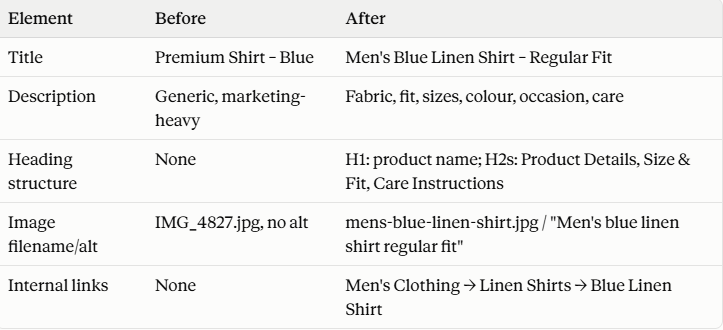
The collection page also needed work. Just “Linen Shirts, 12 products” gives Google nothing to work with. A A short and honest introduction that explains what the collection has to offer and who it is for makes a difference. The solution is not to write a 1,000-word essay, above the products. For shopping the products remain the focus.
Data is monitored in Search Console:
impressions, clicks, click-through rate, average position and which search terms lead to visibility once there is time to spot a pattern.
The Mistake That Ruins Everything: Keyword Stuffing
Shopify SEO for Small Businesses
The biggest error I see is repeating one keyword over and over. A handmade jewellery seller might use “jewellery in Kerala” in every title heading, alt tag, and URL. It sounds unnatural and tells Google nothing new.
A weak product title such as “Best Handmade Jewellery Handmade Jewellery Kerala | Handmade Jewellery Online” gives no value to Google or a shopper, and it hurts Shopify SEO. A better title could be “Handmade Silver Earrings – Minimal Floral Design.” Then the description can naturally include material, size, design, and care.
Two common mistakes to watch out for:
- Over-optimizing individual product pages while ignoring collection pages
- Buying backlinks (“1,000 backlinks for ₹999”). More links don’t equal better rankings. Relevant, earned mentions matter.
The core rule for Shopify SEO: more keywords do not mean SEO. Each page needs to be genuinely useful and match a specific search intent.
Shopify-Specific Technical Issues Worth Checking
Shopify SEO for Small Businesses
Shopify auto-generates canonical tags, robots.txt, and sitemaps. But “automatic” doesn’t mean “set it and forget it.” Here are platform-specific things I always review during audits:
- Canonical URLs: Products can be reached through multiple paths or parameters. I verify the rendered page points to the correct version.
- Filtered/faceted collection URLs: Shopify’s default robots.txt blocks patterns like /collections/+ since they rarely need crawl budget. But if a filtered combo has search demand, it could become an intentional landing page.
- App bloat: A store may grow from 5 apps to 25. Some keep running scripts across the site even when only needed on one template. I check what each app actually does, rather than assuming fewer apps are always better.
- Theme/Liquid performance: Nested loops, too many metafield lookups, and duplicate mobile/desktop components can slow down rendering (checkable using Shopify’s Theme Inspector).
- Core Web Vitals across the full customer path: Homepage → Collection → Product → Cart. Product and collection templates often carry images and widgets.
- Robots.txt and sitemap edits: Shopify’s defaults are already SEO-friendly. I only change them if I fully understand why a custom file exists.
A typical pattern: a fashion store with indexing and proper canonicals but collection pages loading 14 third-party scripts plus a sitewide review app, popup, and chat widget. The problem isn’t that Shopify is bad for SEO ; it ‘s accumulated technical overhead. The fix isn’t optimizing everything at once ; it ‘s finding the highest-impact scripts and removing or deferring them.
Where to Focus on a Limited Budget
When money is tight, spreading effort across all pages is a mistake. I prioritize in this order:
1. Fix indexing and technical issues first. Check GSC status, canonicals, sitemap, robots.txt, mobile usability, and Core Web Vitals.
2. Optimize the 10-20 products or collections with the demand, margin , and conversion potential. Not all 500 equally.
3. Build category/collection structure. For example , Men’s Clothing → Linen Shirts → Individual Products. So collections can act as organic landing pages.
4. Add content around customer questions (“How to Choose the Right Linen Shirt for Summer”) that links back into the relevant collection. Only after commercial pages are stable.
5. Audit app/script bloat for speed improvements without rebuilding the site.
6. Build authority through genuine partnerships, supplier mentions , and relevant directories. Avoid bulk backlink packages.
Technical foundation → Money pages → Collection structure → Content → Performance → Authority
A rollout plan for a Kerala-based Shopify store:
Month 1 fixes technical and indexing issues. Month 2 optimizes products and collections. Month 3 adds supporting content, internal links , and continues performance and authority work. This same process works whether the focus is Shopify SEO in Kerala, Shopify SEO services in Palakkad, or national targeting. The location changes the keywords, not the core method.
FAQs
Shopify SEO for Small Businesses
1. Does Shopify handle SEO automatically?
Yes, indeed, some things are taken care of by Shopify. For example, the tags, XML sitemap, and even the robots.txt file are created with SEO in mind. This is the basic aspect . Then, you have to worry about the product titles, descriptions, image alt text, header hierarchy, links, and so on. There is a difference between Shopify supporting SEO and doing SEO for you.
2. How long does Shopify SEO take to show results?
It depends on where the store starts. If the main issue is indexing , Google not seeing the pages , fixes can appear in Search Console within weeks once pages get recrawled. Ranking improvements from on-page and content changes usually take longer – several months. Google needs time to re-evaluate relevance. The store needs to build signals like reviews, links, and engagement. Anyone promising days to rank probably doesn’t understand how search indexing and ranking work.
3. Is Shopify good for SEO compared to WordPress?
Both platforms can rank well when set up properly. Shopify’s edge is that it comes with technical defaults : sitemaps , canonicals, and mobile responsiveness , which lowers early technical debt for small businesses. WordPress offers control over URL structure, plugins, and custom code. That freedom also means more ways to make mistakes without careful setup. For a business without developers , Shopify’s structured defaults are easier to maintain. The final ranking difference comes down to how each store is optimized, not the platform alone.
conclusion
Shopify SEO for small businesses isn’t about adding more keywords. It’s about ensuring Google can find and understand your store , then making each page genuinely helpful for the person searching. Fix indexing. Optimize the pages that drive revenue. Avoid app bloat. Build authority last. Ten optimized pages will consistently beat a store where every page got a shallow update.
Want More Traffic to Your Shopify Store?
Ready to Grow Your Business Online?
Let’s identify what’s holding your store back and build an SEO strategy focused on sustainable growth.