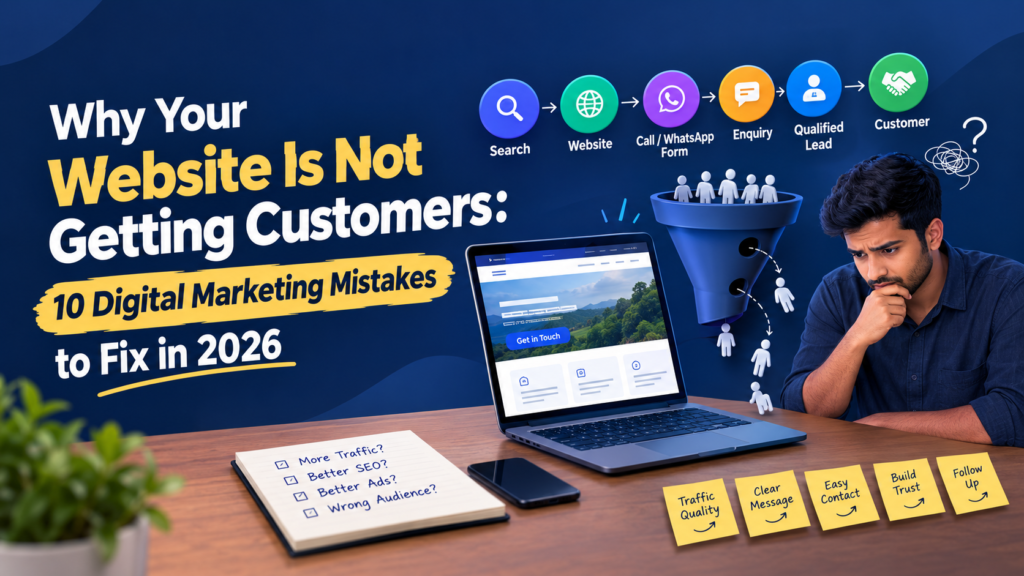
Why Website Is Not Getting Customers
You paid for a good-looking website. You may even run ads. Yet the phone stays quiet, and WhatsApp stays empty. If you are wondering why website is not getting customers, the problem is rarely “not enough traffic”. Most of the time, the website attracts the wrong visitors, confuses the right ones, or loses people at the final step.
As a freelance digital marketer working with local businesses in Palakkad, I start every diagnosis with one question: where exactly are potential customers dropping out of the journey? This guide will go through ten reasons why a website is failing to generate leads and what can be done about each one.
Just a heads up that the sample cases below are for illustration purposes only, and the results may depend on various factors including industry, budget, and time.
Why Website Is Not Getting Customers : First, Find Where the Journey Breaks
A customer’s path usually looks like this:
Search → Website → Call/WhatsApp/Form → Enquiry → Qualified Lead → Customer
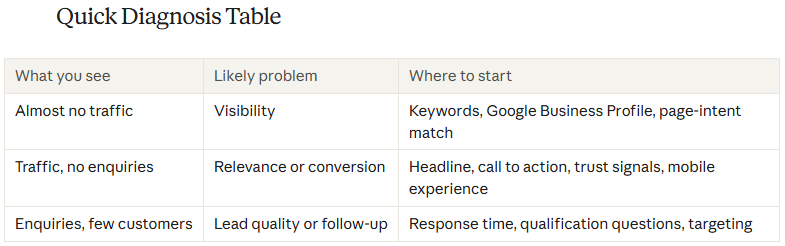
I think about it in three layers:

A weakness in any one layer can leave you with a website not generating leads. The ten mistakes below map to these layers.
Why Website Is Not Getting Customers
1. Building the Website Around the Business, Not the Customer
Many sites read like a brochure: “Welcome to ABC Enterprises. We have served customers since 2015.” But visitors are asking different questions. Can you solve my problem? Do you serve my area? Why should I trust you? How do I contact you right now?
Fix: Rewrite your main pages so they answer those questions on the first screen.
2. A Weak Headline and No Clear Call to Action
If a visitor has to look for an offer and contact details, most of them will leave.
Solution: Use a formula for the header of an important page: offer plus where plus why plus what next.
I think you should replace “Welcome to ABC Interiors” with “Residential Interior Design in Palakkad: From Concept to Reality” and add a button that says “WhatsApp me” or “Book consultation”. If you can make a change this week, do it now.
3. Getting Unwanted Traffic
Being on top of “modern kitchen design ideas” may give you traffic, but they may just need inspiration. “Interior designer in Palakkad” searchers are more likely to convert into clients.
Fix: Choose keyword phrases that have purchase intent and also location, and use informational keyword phrases as a way of gaining trust. Good quality traffic usually outweighs large amounts of unqualified traffic.
Example:
300 visitors = 15 enquiries = 5 customers is much better than
1,000 visitors = 8 enquiries = 2 customers.
4. Several Pages Competing for the Same Keyword
This is a mistake I made on my own website. I created separate pages around “freelance digital marketer in Palakkad”, “best digital marketer in Palakkad” and “top freelance digital marketer in Palakkad”. I assumed more pages meant more chances to rank.
In reality, the search intent was almost identical. Instead of creating more opportunities, I made it unclear which page should represent my site.
Fix: Before creating any page,
map keyword → search intent → page.
Then give each page one job:
-
- Homepage: broad business positioning
-
- Service pages: specific commercial services
-
- Blog posts: informational questions
If a new topic does not serve a different intent, improve the existing page instead.
5. Local Relevance That Is Just a City Name
Repeating “Palakkad” twenty times does not make a page locally relevant. That is keyword insertion.
Fix: Show real local signals:
-
- Your actual service area and services
-
- Consistent name, address, and phone details everywhere
-
- A well-maintained Google Business Profile
-
- Genuine reviews and relevant local mentions
6. Thin Trust Signals
Small businesses often feel they cannot compete without hundreds of reviews. You don’t need to pretend. Just show what is real.
-
- Share real photos from projects and explain what you did in each
-
- Show the owner’s experience, qualifications, or certifications
-
- Explain your working process step by step
-
- Include two or three genuine reviews instead of a flood of fake ones
Never make up testimonials. Instead, create a habit of asking for real feedback after projects. Turn completed work into case studies over time. Google’s advice on building helpful, reliable people-first content also says to show real experience and build trust.
7. Not Measuring What Visitors Actually Do
If you don’t measure what visitors do, you are just guessing. Here are three free tools that answer three questions:
1. Google Search Console: What search terms bring visitors to your site, and are those searches relevant?
2. GA4: Which pages do visitors land on where do they go? Do they click the call button, WhatsApp, or contact form?
3. Microsoft Clarity: Recordings and heat maps that explain why people leave.
Illustrative Example: Search Console will indicate that the service page ranks for the correct search. GA4 will show that the visitors are landing on the page, but they don’t make an inquiry. Microsoft Clarity will show that most visitors leave before reaching the inquiry button. The solution is to move the call-to-action up, not pay for more traffic.
8. Making it difficult for someone to contact you through their phone can hurt your business
The majority of searches for businesses come from mobile devices. If you have a dysfunctional call or WhatsApp button, you are missing out on leads who are willing to ask questions.
People want to connect. They don’t want to hunt for a number or struggle with a link.
Solution: Test your website on your device. Can you dial a phone number? Send a WhatsApp message in two clicks?
If not, fix it. Make sure the contact option is visible and works properly.
A smooth experience builds trust. A fast response builds customers.
Make sure your mobile visitors can reach you easily. That means your call button must work. That means your WhatsApp button must work.
Test it today. Fix it now.
9. Losing leads after the enquiry
Sometimes your website is working fine, and the leads are being lost further down the line. This may be due to a delayed response, a generic “How can we help you?” message, or lack of follow-up, and the potential customer will go to another business.
Here is an easy follow-up procedure:
-
- Respond fast
-
- Record the lead’s details (name, contact, requirement, source) using spreadsheet or any simple CRM
-
- Pose 2-3 quality questions to ask before any pitching is done
-
- One good follow-up move would be calling, meeting or quoting
-
- Send something valuable for follow-up and not a mere “Any news?”
-
- Record the outcome (contacted, qualified, quoted, won/lost).
10. Spending on Ads Without Fixing the Leaks
Clicks do not mean customers. If ads generate clicks but few real inquiries do not raise the budget immediately.
Fix: I would start by looking at the search keywords being used, the location targeting, the ad text and how well the landing page matches both the search and the conversion process. Search keywords to make the location more specific and landing page matches the search Follow the money trail from there:
Ad spend → clicks → enquiries → leads → customers
A low cost, per lead is not helpful if most inquiries are not relevant. Ask yourself “What did the business actually receive for the money that was spent?”
Why Website Is Not Getting Customers :
Frequently Asked Questions
1. Why my website getting traffic but no customers?
Visitors who come to your website are not always people looking to buy. Visitors might not be ready to buy. The website might not show visitors what to do next. Visitors should look at the searches that bring people to the website. Then visitors should check the headline, the call to action, and any trust signals such as reviews or guarantees. Are those headline, call to action and trust signals strong to get visitors to act?
2. How long does it take to get customers from a website?
There is no answer. It depends on how tough your competition is where you started, and how much you can spend. Small changes like making your headline clearer or your call to action stronger can start working. Seo improvements take time—often several months—before you see results.
3. Do I need a website to get more leads?
Not necessarily. A new design won’t fix everything. If your traffic is poor, your message is weak, or you don’t follow up with leads, the new design won’t help. The problem is often not the look. It’s the process. Find the spot first. Is it the message? The flow? The follow-up? Fix that before thinking about a redesign.
4. Is SEO or Google Ads better for businesses?
It depends on what you want and how much you can spend. Google Ads can bring calls and messages quickly. They work well if you need results fast. SEO builds visibility over time. It takes longer to see results.. Once it’s working it keeps working even when you stop paying. Both methods can fail if your landing page is not clear. If people don’t know what to do they’ll leave. A confusing page means lost chances no which method you use.
Why Website Is Not Getting Customers : Fix the Journey, Not the Traffic
The real reason a website is not getting customers is rarely one big mistake. It’s usually a break in the journey. It starts with a search, moves to understanding what you offer, builds trust, and ends with action. If any step fails, the person leaves.
Start this week with three steps:
-
- Rewrite your headline and call to action using the formula above. Make sure they speak directly to the person’s need.
-
- Connect Search Console, GA4, and Clarity. Find the point where visitors drop off. Look at where they stop scrolling or leave the page. That’s your clue.
-
- Give every page one job. One goal. One message.. Reply to every enquiry quickly. Don’t leave people waiting.
If you want help finding where your website is losing customers, get in touch with me for an honest review. I’ll help you see what’s really going wrong.
Why Website Is Not Getting Customers :
Conclusion: Fix the Process, Not Just the Flow
The actual problem with a website that does not attract customers is hardly ever one simple mistake. It is most likely an interruption in the process of searching, comprehension, trust, and conversion. Here is how you can start fixing your website today:
-
- Update your headline and call to action according to the formula mentioned above.
-
- Link Search Console, GA4, and Clarity, and pinpoint the place where your customers are leaving.
-
- Assign every page one single goal, and answer all inquiries right away.