If you’ve been wondering why your website is not ranking on Google, you’re certainly not the only one. This is one of the most common and most frustrating questions that website owners pose, and the truth of the matter is there isn’t always one reason.
After years of auditing sites for clients, I’ve learned that a website isn’t ranking for a reason. It’s usually not one big mistake — it’s a combination of smaller SEO problems stacking up: technical barriers, weak search intent alignment, thin on-page optimization, poor user experience, or simply stronger competition.
This guide walks through the 15 most common SEO problems I see during a website SEO audit, based on real audits and real fixes — not guesswork.
1. Start With Crawling and Indexation, Not With Content
When people ask me about ranking, my first step has absolutely nothing to do with content or keywords. My first step is to check whether Google can crawl and index the crucial pages of a website in the first place. Why bother with keywords if Google cannot find them?
So I go to Google Search Console and its URL Inspection tool and Page Indexing report to check for:
⦁ Pages marked with a no index tag
⦁ Pages blocked in robots.txt
⦁ Incorrect or conflicting canonical URLs
⦁ Crawl errors reported in Search Console
⦁ Missing or incomplete sitemap coverage
Once I make sure that the important pages can be seen by search engines, then I begin working on keywords the reason people are searching how good the content is, how well the website is set up for search engines, links inside the website, and links from websites. If you miss this step, you could spend weeks making your content better only to learn that Google isn’t able to see it at all.
2. A Real Example: Indexed Pages That Weren’t Actually Indexed
As a freelance digital marketer , once i worked on a website where several important service pages were live, well-written, and genuinely useful — but they weren’t showing up in Google at all. Search Console confirmed the URLs weren’t properly indexed.
As a result of my research, I identified technical problems that influenced the ability of Google to index and work with these pages. I checked the robots.txt file, indexing instructions, canonical links, the XML sitemap, and internal linking. After solving technical issues preventing Google from doing its work, I added these pages to the XML sitemap and created internal links to them from related pages. Then I requested indexing in Google Search Console.
Conclusion: the website did not need any new content to be generated at first – it needed to be able to reach Google, crawl these pages, and understand them.
3. Focusing on Keyword Optimization without Considering Search Intent
Perhaps one of the most common, yet most surprising mistakes that I still observe is when website owners build content based on keywords without considering the search intent of their visitors.
For example, a company may develop a web page targeting a keyword such as “SEO services” but not provide clear information about what services it offers, what kind of people it helps, how its approach is different from competitors’, and what should be done by the visitors. The web page is optimized for the target keyword but not for the visitor who typed it.
Unfortunately, keyword stuffing is still regarded by far too many site owners as an effective SEO tactic. However, it does not matter how many times the specific keyword is used – what really matters is whether the web page is structured properly, contains relevant keywords that address the search intent of visitors, provides expert knowledge, and performs better than others in comparison.
The solution is quite simple: know what the user wants and optimize the page according to that intent.
4. Other SEO Problems Worth Ruling Out
Beyond indexing and intent, these are the other issues that most often surface during a website SEO audit:
⦁ Thin or duplicate content across multiple pages
⦁ Missing or poorly written title tags and meta descriptions
⦁ No clear H1, or multiple H1s on the same page
⦁ Slow page speed and poor Core Web Vitals
⦁ Pages that aren’t mobile-friendly
⦁ Broken internal links or orphan pages with no internal links pointing to them
⦁ Redirect chains and loops
⦁ Missing or incorrect structured data
⦁ Weak internal linking structure between related pages
⦁ Low-quality or spammy backlinks
⦁ A backlink profile that’s simply thinner than competitors’
⦁ Keyword cannibalization — multiple pages competing for the same term
⦁ Outdated content that hasn’t been refreshed
5. My Audit Framework for Ranking Issues
Instead of guessing, I rely on a proven audit framework in every audit I perform. Crawl → Index → Intent → On-Page → Technical → Authority → Monitor:
1. Crawl and Index – Make sure Google can crawl and index the pages that you need to by using Search Console (robots.txt, noindex, canonical URLs, crawl errors)
2. Intent – Make sure that the website has the keywords and content that match the user queries
3. On-Page – Consider title tags, headings, content, internal links, URLs, images
4. Technical & UX – Consider page speed, Core Web Vitals, mobile usability, redirects, broken links, structured data, sitemap
5. Authority – Compare the site’s content and link profile against those of competing websites that are ranking
6. Prioritize – Prioritize the identified issues based on their potential impact rather than trying to fix all at once
7. Monitor – Measure results using Search Console and organic traffic
Don’t try to figure out why a website is not showing up in search results. Check it step by step, find the issue, fix the problems that have the biggest effect, and watch what happens after that.
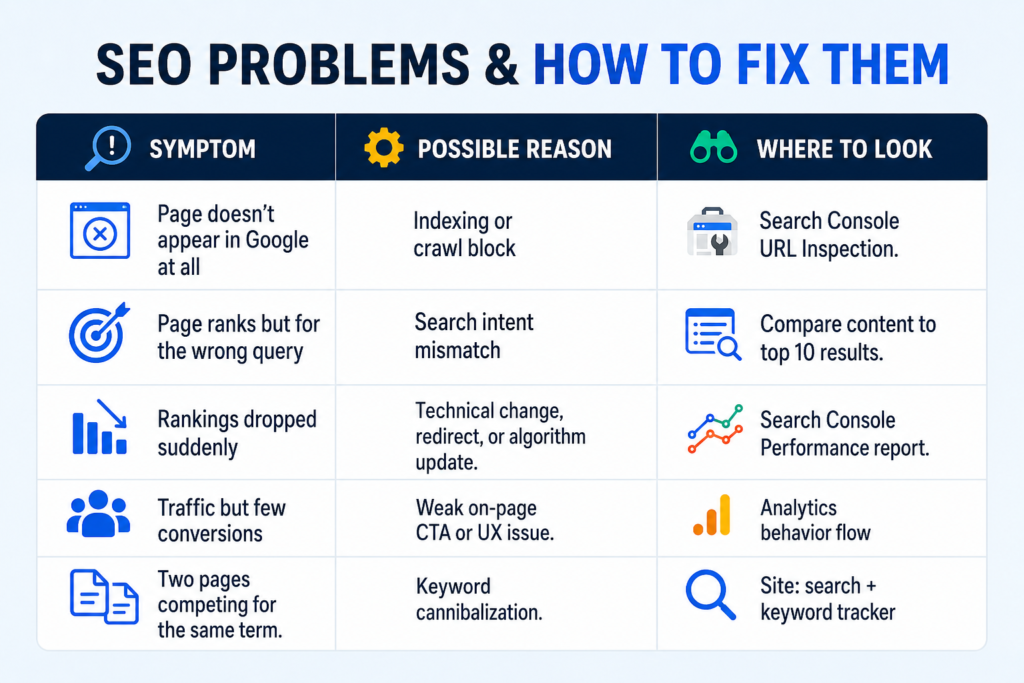
Quick Reference: Symptom, versus Possible Reason
Use this table to start looking when you’re not sure where to begin.
FAQs About Websites Not Ranking on Google
How much time does it take to fix SEO issues and notice results?
That depends on the problem at hand. Fixes to indexing problems will show up within several days after Google recrawls the page. Content and authority issues may take weeks or even months since Google needs time to reevaluate relevance and authority.
Is it possible to rank without any backlinks?
Yes, it is possible in the case of non-competitive keywords and good on-page relevance and technical SEO. With competitive keywords, backlinks become an important part.
Is ranking the only sign of successful SEO?
Rankings are essential, yet more important are the questions of attracting correct traffic, engagement of visitors and conversion rate. Good SEO makes a website more useful, accessible, trustworthy, and relevant, not just highly ranked.
Conclusion: Forget About Secrets, Start SEO Audit
There’s a common misconception that SEO is all about finding some kind of magic formula to get your website on page one. This is not true. If the website does not rank, there is definitely a serious issue that exists; this can range from a technical issue to targeting inappropriate search intent or just a plain lack of authority and even competition.
The path forward is a proper SEO audit: identify the real problems, prioritize them by impact, make meaningful improvements, and give Google and your users time to respond.
Actionable takeaways:
⦁ Confirm indexing and crawlability before touching content or keywords
⦁ Match content to search intent, not just keyword frequency
⦁ Run a full audit across on-page, technical, and authority factors before making changes
⦁ Prioritize fixes by impact instead of trying to fix everything at once
⦁ Track rankings and conversions, not rankings alone
Why Your Website Is not Ranking on GoogleWhy Your Website Is not Ranking on GoogleWhy Your Website Is not Ranking on GoogleWhy Your Website Is not Ranking on GoogleWhy Your Website Is not Ranking on GoogleWhy Your Website Is not Ranking on GoogleWhy Your Website Is not Ranking on GoogleWhy Your Website Is not Ranking on GoogleWhy Your Website Is not Ranking on GoogleWhy Your Website Is not Ranking on GoogleWhy Your Website Is not Ranking on GoogleWhy Your Website Is not Ranking on GoogleWhy Your Website Is not Ranking on Google